Friday, September 28, 2007

Anonymous Users – Access Denied

At a client recently we tried to enable Anonymous Access to a WSS site, but unauthenticated users were still being prompted for a username and password. If you cancelled the log-in prompt, you would get an IIS "Access Denied" page. So I ran through the default tests:

  • Web Application created with the "Allow Anonymous" setting enabled – Check
    (by the way, after the Web Application has been created this setting is managed from the Application Management – Authentication Providers section)
  • Site Collection has anonymous access enabled for the entire site – Check
    (Site Settings – Go to top level site settings – Advanced Permissions – Settings – Anonymous Access)

That should have been it. After some tinkering around I discovered the problem was a web part on the home page. This was trying to filter the list of tasks based on the current user. Taking the web part off the page resolved the problem.

If you really need this functionality you will need to develop your own custom web part that will first check if the current user is authenticated before retrieving and filtering the items.

Wednesday, September 19, 2007

WSS 3.0 Search Capabilities

Greetings from Singapore! I'm here attending a training course on MOSS Administration, but more on that some other time. Right now what I've brought you here to talk about is WSS Search. So it is common knowledge that the search technology has changed between version 2 and version 3. In version 2, WSS used SQL Server full text indexes. Now WSS uses the same underlying engine for indexing content as MOSS.

However, what I feel isn't common knowledge is how this affects the end user experience. When you performed a search in WSS 2.0 you could only get results back from the document libraries and lists in your current sub-site. You don't see results from any sites underneath it. In WSS 3.0 it's a very different story. Not only will you see results from any child subsites, you will also see results from any site collections located underneath the sub-site you are searching! Surprised? I was.

So this means that you can run a search from the very top of your website and it will search the document libraries and lists in all your site collections. The results are still security trimmed. Nice.

Tuesday, September 04, 2007

User Presence in WSS


You might have noticed the User Presence icons in SharePoint. They have been there since version 2. You will see them appearing beside a user name, like "Modified By" or "Assigned To".

This will work with your instant messaging software to display your availability status to others. For organisations that have Microsoft Office Communicator installed, this works with little or no configuration. You can see when your colleagues are online, and even look up their other contact details, such as their extension.

The User Presence information also works with MSN Messenger. The only hassle with this in WSS v2.0 was that you had to use your MSN Messenger e-mail address in the SharePoint environment. Well, now in WSS 3.0 you get to specify a separate field for your User Presence details. So you can now get your SharePoint alerts submitted to your work account, but have your User Presence information based on your MSN account.

To update your details just go to the top right corner of any page on your SharePoint site and drop down the Welcome ... menu and select My Settings.


You can then edit the SIP Address to be the e-mail address of your MSN Messenger account. Voila – your user presence details should now be available for others to see. Change your status in MSN Messenger and the user presence information updates almost straight away on the SharePoint site.

No? Still can't see your user presence details? You might want to add your WSS site to the Trusted Sites zone in Internet Explorer (Tools – Internet Options – Security)

One final thing – the SIP Address information is stored at the Site Collection level. If your environment has many site collections, then you will have to update each one individually

Saturday, August 25, 2007

WSS 3.0 Content Indexing: The update cannot be started

I noticed recently that I was getting an error in my Application Event log every time the WSS Search Service ran. That means an error every five minutes, which is a little disheartening. One option is to change the WSS index schedule so that the error only occurs once per day – but some might say that is avoiding the issue. Which I suppose is a fair point.

The error that was showing up in my Application Event Log was:

Event ID 2424
The update cannot be started because the content sources cannot be accessed. Fix the errors and try the update again.

Context: Application 'Search', Catalog 'index file on the search server Search'

I fixed this by going to Central Administration – Operations – Services on Server. I selected the Windows SharePoint Services Search entry. I then changed the Service Account username and password to match the Content Access Account details. Click OK on the bottom of the page and wait five minutes.

Once I saw that the error was no longer being logged I went back and set the Service Account back to its original username and password. Still no sign of the error. I also verified that WSS was indexing content again.

So a bit of a strange issue. It looks like some settings got messed up along the way and just need to be reset. I did notice that the error started to happen after some scheduled maintenance on the SQL Server. I'll have a word with the SQL Admin and see what he's been up to.

Monday, August 20, 2007

August 2007 User Group meeting

We have a jam-packed session this month. Brad Saide will be presenting on the Business Data Catalogue. Then Han Duong will cover customizing SharePoint themes. To top it off Jey Srikantha from K2 is returning to show us the K2 Blackpearl capabilities. This extends the out of the box workflows in ASP.net and integrates directly with MOSS 2007.

This month's session is on Tuesday 21st at the Unique World offices in Haymarket. So come along, grab some beer & pizza and mingle with the local SharePointers. For more information go to http://sps.uniqueworld.net/sydney.

Sunday, July 01, 2007

Bluetooth Mouse on Windows Vista Macbook Pro

This post has nothing to do with SharePoint but I thought I'd blog it anyway in case someone else is trying to do the same. I'll admit it probably isn't a common scenario, but you never know.

I'm currently using a 17" MacBook Pro as my laptop. I've used Apple Bootcamp to create a Windows partition and I installed Windows Vista. It's a great setup and I love using the machine. It's got 2 GB of memory and dual 2.33 GHz intel processors. However, one thing was bugging me – I couldn't get the internal Bluetooth device working. This meant I couldn't use my groovy Microsoft Notebook Presenter Mouse 8000.

From the blog posts I could find I seemed to be in the minority. A few people wrote that Bluetooth was working fine for them right after install. Some people had steps for manually enabling Bluetooth, but this seemed to be for earlier releases of Bootcamp because I couldn't find the files they were referring to.

So here are the steps that I used to get it working. Some of these may be redundant – feel free to experiment and leave comments:

  1. Downloaded and installed the Bootcamp 1.3 beta software from the Apple site to my Mac partition
  2. Created a Mac Driver disk using the Bootcamp Assistant
  3. Booted into Windows Vista and ran the Setup.exe on the Mac Driver disk
  4. Launched the Device Manager. Expanded out the Universal Serial Bus controllers section. I was looking for the device with a Hardware ID of USB\VID_05AC&PID_1000 (I found these details here). To view an entry's Hardware ID:
    1. Double click on the entry under the Universal Serial Bus Controllers
    2. Click the Details tab
    3. Change the Property drop down to Hardware IDs
  5. Once you have found the right device select the Driver tab
  6. Select the Update Driver... button
  7. Select Browse my computer for driver software
  8. Select the C:\Mac Drivers\program files\Macintosh Drivers for Windows XP 1.1.2\BthKicker location

Once I completed these steps Windows Vista identified a new device and tried to install a driver for it. It couldn't find an appropriate driver. At this stage most people would get dejected, but I'm used to this kind of thing. The next thing to do is run the\Drivers\Apple\AppleBluetoothInstaller.exe file on the Bootcamp Assistant CD that you created earlier.

And that was it, my Bluetooth mouse now works with my Vista install running on a MacBook Pro. I love it.

Friday, June 22, 2007

MySite Hotfix

I ran into a problem at a client site recently. We already had the ability to create MySites, but they were being created under the Shared Service Provider website. We wanted these under the main portal instead. Not a problem – we set up a managed path on the portal and created a new site collection underneath it to host the My Sites. We made sure to select the My Site Host template when creating our new site collection. From the home page of the site collection we specified that we wanted to use this as the location for new My Sites. This worked just fine in our development environment. A user without an existing MySite could click the MySite link at the top of the page and their site would be created for them within the main portal.

Not so good in the production environment though. When you tried to create a new MySite you would see an error along the lines of:

There has been an error creating the personal site. Contact your site administrator for more information

Looking in the SharePoint logs revealed the following error:

The site /personal/demo could not be created. The following exception occured: Value does not fall within the expected range

I certainly wasn't expecting that. Luckily I found that Microsoft has released a hotfix specifically for this issue. The details are at http://support.microsoft.com/kb/937207. You will need to contact Microsoft to get them to e-mail you the patch. Once we ran this in our environment all was well again. One thing though – the documentation for the hotfix says that it does not require a reboot, however we were prompted to perform a reboot after installing it.

Wednesday, May 30, 2007

...In with the New

Microsoft have just announced that they have received Department of Defence 5051.2 certification (DoD 5051.2) for Microsoft Office SharePoint Server 2007. Great huh? But what does it mean? DoD 5051.2 is a US Government standard for records management. Any records management solution used in the US Government must have this. It's also becoming a de facto standard in other industries too.

Microsoft have developed an add-on pack to provide the additional features required by the DoD 5051.2. If you want to comply with this standard you will need to run this (soon to be released) add-on pack as well. If you don't need to comply, then kick back and relax.

Read more here:

http://www.cmswire.com/cms/records-management/microsoft-delivers-on-dod-50152-cert-promise-001323.php

Out with the old...

Got any servers running the Beta 2 Tech Refresh of Microsoft Office SharePoint Server? Well, the bad news is that it expired on May 15th. The good news is that you can get information on how to upgrade to the released version here:

http://technet2.microsoft.com/Office/en-us/library/3df597d0-bad0-4c73-9c26-a10bb80449881033.mspx?mfr=true

Tuesday, May 29, 2007

Knock, Knock...

MOSS 2007 allows users to send an e-mail to request additional access to a site. But do you know who this e-mail goes to? Or for that matter do you know where to go to configure this?

This setting is available from the Site Permissions page. To access this go to Site Actions – Site Settings – People and Groups. Now click on the Site Permissions link in the left hand panel. From this page you can select Access Requests from the Settings menu.


If you cannot see this menu item you (or your SharePoint Administrator) should check that the Outgoing Mail Server setting is configured for your environment. This is done through the Operations section of the Central Administration site.

So how does SharePoint determine what e-mail address to use by default? It's simply whoever initially created the sub-site. It can only be set for sites that do not inherit permissions.


So here's a pop quiz for you: Let's assume Bob created a sub-site called Department X along with a child site called Projects. Initially Projects inherits its security settings from Department X. Then Sue comes along and configures the Projects subsite to use unique permissions. Who do you think SharePoint will use for the Access Requests settings?

  • Bob
  • Sue
  • No-one

I'll give you a hint, the answer rhymes with True.

Thursday, May 17, 2007

ForeFront SharePoint TechCenter

Microsoft now have content on TechNet specifically about ForeFront and SharePoint - http://www.microsoft.com/technet/forefront/serversecurity/sharepoint/default.mspx. ForeFront is Microsoft's anti virus product. It includes 8 anti-virus engines to scan content. Up to five of these will be used during any individual scan. This ensures good coverage across a range of attacks. Seven of the engines are from external vendors - AhnLab, Authentium, CA, Kaspersky, Norman, Sophos and VIrusBuster.

There doesn't seem to be many other vendors offering SharePoint 2007 AntiVirus software just yet. McAfee and Symantec still only advertise a SharePoint 2003 product. Hopefully more vendors will step up soon. With SharePoint becoming increasingly popular as the collaboration and file storage platform, anti-virus is going to be a must-have feature.

Wednesday, May 16, 2007

SharePoint User Group tonight

The SharePoint Conference has been a great success. There were some really good presentations and I've enjoyed catching up with a lot of people that I haven't seen in a while. So far the most fun part has been the unicycle - pictures to follow.

Of course the real highlight is the SharePoint User Group meeting that is going to start at 5:30pm. This is going to be in Room 2 on the lower level. Andrew Connell is going to join Mike Fitz and Joel Oleson on the panel to answer your questions.

Looking forward to seeing you there

Sunday, May 13, 2007

SharePoint APAC Conference Session Recommendations

Going to the SharePoint APAC Conference on Tuesday and Wednesday this week? Here are my agenda recommendations. I'm presenting the session on MOSS and Enterprise Architecture – the rest of the sessions compliment this theme. There are a lot of other great sessions on though so make sure to check out the schedule.

Tuesday

Code

Session

Room

Time

ARC01

MOSS and Enterprise Architecture 

Lower Level Room 4

11:00

ARC03

Business Data Catalog and LOB

Ballroom B

13:20

ARC04

BI with Excel Services 

Ballroom B

14:25

ARC05

Web Content Management Overview 

Ballroom B

16:10

Wednesday

Code

Session

Room

Time

ARC10

Multilingual Portals 

Lower Level Room 2

09:15

ARC06

Search Technical Drilldown

Ballroom A

11:00

ARC11

Document Management & Taxonomy 

Lower Level Room 2

13:20

DEV06

Coding Compliance Components

Lower Level Room 3

14:25

Pan01

Panel Discussion with SharePoint Experts 

Ballroom B

16:10

SUG01

Sydney SharePoint User Group

Room 2

17:30

Technorati tag:

Thursday, May 10, 2007

Presenting at the SharePoint APAC Conference

I've just finished a round of presentations on SharePoint Enterprise Search. Next week I'm off to the SharePoint APAC conference in Sydney to give another presentation. The topic is "How much can MOSS replace your Enterprise Architecture?"

If you are around, do drop by and say Hi. When not presenting I'll be at the Unique World stand. Don't worry – you won't be able to miss the stand.

Find out more about the conference at http://www.microsoftsharepoint.com

Sunday, May 06, 2007

All Joost Up

I've managed to get myself a Joost invite. This is the future of TV. I've been interested in the convergence of TV and PC technology for some time, and Joost looks like the best combination I've seen to date. It took me about 2 minutes to get this up and running, and my initial experience is positive. The picture quality isn't great, and I've been disconnected once or twice from the shows that I was watching, but it's still a hell of a lot of fun.


I don't have any invites yet, but as soon as I do I'll pass them around. It looks like Joost may be days away from launching, so that mightn't even matter soon.


Update: I can send invites now, so if you want one, just drop a comment with your e-mail address


Sunday, April 22, 2007

WSS 3.0 Hosting Providers

I have been researching WSS 3.0 web hosting providers, so I thought I'd share my list with you. This is not an extensive list of providers, but I'm hoping to add to it as I find out about others. I'm only showing the basic plan for each provider, to give some level of comparison. Figures valid as of April 22, 2007-04-22


Website

Plan name

Yearly fee

Storage

Users

Notes

http://www.frontpages-web-hosting.net

SharePoint Basic 

$212 USD 

1 GB 

Unlimited

30 day free trial 

http://www.webcentral.com.au

Managed SharePoint 

$860 AUD 

0.5 GB 

25


http://www.724hosting.com

SharePoint Hosting

$239.40 USD 

0.5 GB 

25

15 day free trial 

http://www.webhost4life.com

Basic

$139.35 USD 

0.5 GB 

50

Select the Advance ASP.net hosting option ($9.95 pm), then add the SharePoint Basic component ($19.94 py)

http://www.sharepointsite.com

Bronze

$383.52 USD 

0.15 GB 

50


http://www.alentus.com

SharePoint Professional Plan 

$371.40 USD 

0.2 GB 

40


http://www.sharepointhosting.com

Bronze Hosting 

$299.50 USD

1 GB 

Unlimited

Daily backups

http://services.mail2web.com

SharePoint

179.40 GBP

0.5 GB

Unlimited


http://www.ultimahosts.net

SharePoint.net 3.0

$300 USD

5 GB

Unlimited

Nightly backups

http://www.phase2int.com

SharePoint Standard - Basic

$300 USD

1 GB

40

Nightly backups, 30 day free trial

Tuesday, April 17, 2007

Bob Fox - Screencaster

Check out the following screen casts from Bob Fox that visually demonstrate some useful concepts

How to Screencast:  Setting up your Virtual Lab Part 1 – Setting up Active Directory, POP3, SQL and IIS

How To Screencast: Alternate Access Mappings or AAM – An introduction to setting up alternate access mapping

Friday, April 13, 2007

April SharePoint User Group

Anyone in Sydney on Tuesday April 17th should try to come along to the Sydney SharePoint User Group meeting. We got two great speakers lined up. Noel Williams from MacroView is going to demonstrate tools that help you manage your e-mails directly in SharePoint 2007.

Then we have Stephen Cummins of www.SPSFAQ.com coming along to tell his tales from the trenches. This guy has been involved in more than 30 SharePoint deployments for companies such as HP, Kraft and the Disney Corporation. That's a wealth of experience that you don't get to meet every day.

So hop over to here to register for the event. It's on at the Unique World offices in Campbell Street (map). For more information about the user group and to subscribe to e-mail notifications on upcoming events check out http://sps.uniqueworld.net/Sydney

Ivan

Monday, April 02, 2007

Slow file uploads

I was working with a client recently that was experiencing poor performance on their SharePoint environment. They were about to go live, but the performance testing was coming back with terrible results, even with only a small number of users. Initially we weren't sure where the problem was, but we were able to quickly isolate the issue down to network performance.


We noticed that certain users were able to upload quickly, but for other users the file upload process crawled. We ran up Performance Monitor on our front end SharePoint server to see what was happening. Adding the Total Bytes/sec monitor in the Network category gave us some useful information. For the users experiencing the good performance, our monitor would spike and then drop back to zero (the blue line below). For those experiencing bad performance the network utilisation would stay low. Something was throttling the network bandwidth for these users


To cut a long story short, the client finally discovered that the issue was to do with a default setting in Internet Explorer 6.0 and earlier. This limits the data rate that the browser sends information. This becomes particularly noticeable with larger files (e.g. greater than 2 MB).

To resolve the issue you need to make an update to the registry on the user's computer. You can read more about this here

Sunday, April 01, 2007

Ishai Sagi is MVPed

I just heard from Ishai that he has been awarded an MVP in SharePoint. Well deserved too – this guy puts so much effort into his blogs, forum posts and community presentations. Congratulations buddy!

Publishing from Word 2007

Finally! I now can publish to Blogger directly from Word 2007. I could never get this working before, but I have just rebuilt my laptop and I was able to register my account without any hassles.

Tuesday, March 27, 2007

Renaming the Central Admin Content Database

I worry sometimes that I might be just a little too pedantic. I can spend way too long figuring out an ideal naming convention. So you can imagine my distress to discover that MOSS 2007 does not give you the option to name the Central Administration content database.

You are able to specify a name for every other database in your installation except this one. It's pretty upsetting for someone as anal as me. All the other databases have a naming pattern that you could write a song to, but the Central Admin content database uses some horrid GUID for it's name.

I decided that I needed to fix this. There is a good reason for this - your SQL Server might host a few Central Admin content databases from different SharePoint Farms. In which case it would be nice to know which SharePoint farm the database belonged to without having to check a list of GUIDs somewhere.

In theory it's relatively straight forward - here are the steps, taken mainly from Ricky Whitworth's blog entry:
1. From Central Admin, remove the existing content database from the Central Admin Web Application.

WARNING: This will break your Central Administration site until you complete the rest of the steps!

2. Backup the existing Admin content database from SQL
3. Restore the backup to SQL using a name that makes you happy
4. Use the STSADM -AddContentDB to attach your renamed content database into your Central Admin site

It was this final step that caught me out. I kept getting a "Access Denied" message. This is not particularly what you want to see when you have just broken your Central Admin site.

What I discovered is that you need to run this command using the AD account that you specified for connecting to the database during your SharePoint installation. Now normally this account should not be a local administrator on your web front end server. However I also found that the command did not work for me until I made this account a local administrator.

So here are the extra steps I carried out between 3. and 4. above:

1. Grant the account running the Central Admin application pool access to the Local Administrators group on your SharePoint server

2. Use the "runas /user:myDomain\myAccount cmd.exe" command line to launch a command window under the credentials of the Central Admin application pool account.

3. Run the following command in your new command window:
C:\Program Files\Common Files\Microsoft Shared\web server extensions\12\BIN\stsadm.exe" -o addcontentdb -url myCentralAdminSite -databasename myCentralAdministrationContentDatabase

4. Remove the account from the Local Administrators group

Update:Here is a post from Keith Richie on how you can use psconfig.exe to set the database name during your initial installation

Wednesday, March 21, 2007

What a crazy week

I'm just back from the Microsoft MVP Summit in Seattle. What a whale of a time. I finally got to meet many of the other SharePoint MVPs in person. We even spent some time with the SharePoint product team giving our input into what we think is important for the next release of MOSS.

If only every week was as interesting as that. You can check out some photos of the week here

Now, must get back to work

Wednesday, March 07, 2007

SharePoint Conference - Sydney May 15-16 2007

The circus is coming to town!

Well, almost as exciting - the SharePoint Conference is coming. Sydney is the third city to host this show, with great reviews already in from Seattle and Berlin.

The conference is going to be at the Hilton Hotel and will include such SharePoint greats as Mike Fitz, Joel-The-Man-Oleson and ring master Derek Burney. With any luck the Sydney SharePoint User Group will also be well represented.

There are only 500 places available so make sure to book the 15 and 16 of May out in your diary now. Registration for the event will open soon. Check out Angus Logan's blog for more details.

Monday, March 05, 2007

No Underscores in MOSS

I just found out that MOSS doesn't like Underscores in Host Headers. If you try to create a new web application with the "_" in the Host Header, SharePoint rejects it as an invalid character.

This also applies to setting up Alternate Access Mappings for an existing web application

Saturday, March 03, 2007

How do I...in SharePoint 2007

Check out this new content on MSDN that descibes how to do common development tasks in SharePoint 2007:

http://msdn2.microsoft.com/en-us/library/ms550086.aspx

Sunday, February 25, 2007

Browsing to a VPC from the host

This is something that I am always trying to figure out. I stumble across a solution and then forget how to do it next time. So here is the link that describes how to set up your VPC so that you can browse to it from the host desktop:

http://blog.devstone.com/aaron/archive/2005/05/03/577.aspx (courtesy of Aaron Zupancic)

Now I know where to find it next time I have to look

Development Environment for MOSS 2007

I'm interested in working out the best approach for developing on MOSS 2007. My first preference is to have a central MOSS server that is shared by the team and allow developers to debug remotely.

The advantages that I see with this are:
  • The development environment remains similar to the production environment

  • Less resources required on each developer's workstation

  • Better chance of identifying issues with other developer's code early on

  • Forces you to have good deployment strategies that can be re-used for deploying to test/production/DR environments


  • The disadvantages are:
  • Harder to debug - must be done remotely, and from what I hear this is particlarly difficult with workflows

  • Risk of overwriting other developer's efforts (proper use of a source control product reduces this risk)

  • May need to co-ordinate debugging/testing with others in the team


  • For me, the advantages outweigh the disadvantages, but I'm keen to understand other people's experience in this area. Please provide your comments if you have any experience/opinions on this.

    The other configurations that I see include:
  • Installing Visual Studio on the Dev server and allowing developers to remote-desktop on to debug. I dislike this because it means that you have to modify the permissions on the server, it means the Dev and Test environment are significantly different and puts extra load on the dev box. Also only two developers can work on the server at any time (assuming you only have the standard Terminal Service licenses).


  • Each developer running local Virtual PCs. Because our company mainly does on-site consulting, a lot of our developers have laptops. This makes it more expensive to beef their machines up to a spec that can comforatably run a MOSS 2007 VPC that runs Visual Studio. In fact a few of our laptops cannot have their memory upgraded beyond 1.5 GB. Another hassle here is that each developer is working in isolation. Conflicts between components won't be discovered until a later stage. This risk can be reduced by having strong source control and deployment processes.


  • I also found this great post from Eli Robilliard on this topic:
    http://weblogs.asp.net/erobillard/archive/2007/02/23/build-a-sharepoint-development-machine.aspx

    Thursday, February 15, 2007

    February SharePoint User Group

    For those of you in Sydney, the SharePoint User Group is meeting on Tuesday 20th. This month's presentation will be of particular interest to SharePoint 2007 administrators and developers.

    Read more at http://sps.uniqueworld.net/sydney

    Friday, February 02, 2007

    Ontolica goes Wild*

    Ontolica has announced a free tool for adding wildcard search features to MOSS 2007. Just fill out the form here.

    Ontolica will be coming out with more new products this month that extend the MOSS 2007 search features. Here is a look at their roadmap:

    Ontolica Add-ons for MOSS 2007

    Monday, January 29, 2007

    My new favourite website

    I just found out about this website, but I think it's going to become a regular haunt for me. Strangely it has nothing to do with SharePoint:

    www.pandora.com

    Give them the name of a favourite song or artist and they will create a personalized radio station for you based on that style of music. You can rate each song they give you to help fine-tune the station. And it's all free!

    Now that I think about it, it does have something to do with SharePoint. This is very similar to the Knowledge Network component that Microsoft is planning to release later this year.

    This wil allow you to track down other people in your organisation that share similar attributes based on your SharePoint profile. It can even look through your e-mails for keywords to suggest to you to add to your profile.

    So not only can you find out about new music that you would like, but you can also track down that other person in your organisation that is passionate about Information Architecture for legal firms.

    Isn't the internet wonderful?

    Wednesday, January 17, 2007

    Grouping Documents By More Than Two Levels

    We are all very used to organizing our documents by folders. We have been doing it for years in File Explorer. But it does have it's drawbacks. For example you can only organize a set of documents in one way. You might have reports that you file by region. If you wanted to see them by Customer instead, you are stuffed.

    Then SharePoint came along and provided meta-data. Now we have the ability to tag our documents with the relevant properties (such as Region and Customer). We can define views based on these properties to see our documents in many different ways. We can even combine folders and meta-data so that users can continue to file documents in folders, while at the same time providing views based on the meta-data.


    The "Group By" view option allows you to define a hierarchy for viewing the documents - say by Country and then by Region. But what if you need to go beyond two levels? What if you want to view documents by Country, Region and Store? This article explains how you can achieve this using SharePoint Designer and WSSv3 (most of this is the same in FrontPage 2003 and WSSv2).


    I will assume that you already have a document library with the necessary meta-data. To make it more interesting, I'm going to also assume that your documents are stored in a folder structure within the document library.

    1. Launch SharePoint Designer and open your site (File - Open Site...)

    2. Open the default.aspx file in your site. We will place our web part on this page

    3. Select the Data Source Library tab in the right hand task pane

    4. Open the drop down listbox for your Document Library and choose Copy and Modify...
      Copy and Modify


    5. On the Source tab, change the Item and folder scope to RecursiveAll

      Data Source Properties - Source


    6. On the General tab give a meaningful name to this Data Source and click OK

      Data Source Properties - General


    7. Drag and drop your new data source onto a web part zone. Now click on the > button on the right-hand-side of your new web part. You will see the following menu, select Sort and Group:

      Sort and Group


    8. Use the Add >> button to specify the fields you want to group your data for. Click on the Show group header checkbox for each of the fields you move across. Click OK once you have finished.


    9. Now from the right-hand-side menu select the Filter option. Specify the filter shown below. This will make sure that folders are not displayed in your web part. Click OK and you are done.

      Filter Criteria

    This works if your web part is going to be on the same sub site as the document library. In my next post I'll show you how you can do this with a document library from another site.


    Note: I've noticed that once you get to four levels, the web part does not correctly group items. It basically uses the first value it finds to group all items at each of the 4-level-deep branches. If I find a fix to this, I'll let you know.

    Monday, January 15, 2007

    You've been tagged

    Five things you never knew about me

    Here are the rules - you get tagged by a colleague/friend/complete stranger, you have to blog five things that people don't know about you and then pick five more people that should do the same.


    By my calculations the entire blogosphere should be tagged by February 3rd - I guess it's all part of being Person of the Year.

    Ishai Sagi was so kind as to tag me, so here you go:

    5. I'm not Canadian. I reckon more people ask me if I am Canadian than any other nationality. I've never even been to Canada (eh?). In fact I'm Irish. I'll admit that my accent isn't a very strong Irish accent. Some people have suggested that the Irish accent has had a strong influence on forming the American accent. Personally I think it's because I watched too much Sesame Street as a kid. So my theory is that people hear me talk and think "hmm, not quite American, he must be one of those Canadians (eh?).


    4. I was going to be an RPG programmer for Microsoft. We are not talking about Role Playing Games, this is the Report Program Generator language. I interviewed for a consulting firm doing work at Microsoft in Dublin. Our university was one of the few places that taught RPG and Microsoft were running their manufacturing on an IBM AS/400 at the time (there's one thing you didn't know about Microsoft). In the end, they gave me a job working on VB and SQL projects instead.


    3. My first computer was a Sinclair ZX81. I think I was 10 at the time. I remember trying to grasp concepts such as for loops and If/Else statements. I still remember the so-called "touch-sensitive" keys and the fact that you would have to wait about 10 seconds for the screen to refresh every time you pressed a key. After all, it did only have 1 KB of memory.

    2. I failed Irish in school. Shameful really. The Irish language is compulsory in school up to your final exams at 18. I was shockingly bad at it. I found it impossible to spell, and the grammar just threw me completely. My poor Irish teacher put in so much effort to helping me, but he got so little out of it. The scary thing is that you need Irish to get into a lot of university courses. Thankfully, the one I wanted didn't require it. I didn't even bother studying the night before my final exam. I worked on my maths study instead (god knows I needed it).

    When it came time to do the exam paper, I wrote a letter in English to the examiner, letting him know that he could go off and make himself a nice cup of tea, that I was not going to force my shocking spelling skills on him. When I got my final grades, I wasn't too surprised to discover I failed. My parents weren't that happy and they suggested that I have my paper re-checked. I declined. So now I'm not eligible to apply for any government job in Ireland, which hasn't proved to be a big drawback since I've moved to Sydney.


    1. I've had Blues Harmonica lessons - note the distinction between "I've had lessons" and "I can play". I've always been a fan of the Blues, so when I saw some lessons advertised, I signed up with another friend. We gave each other Blues names - he's Magic Eight-Ball Delahunty, I'm Bleeding Gums Wilson. Despite these great names, I have yet to reach a level of proficiency where I'd feel comfortable quitting my day job and make a living busking on the streets.


    My turn to tag - not that there are many people left:

    Friday, January 05, 2007

    Discovery Wizard for SharePoint

    I just found this handy free tool on the Quest website. It will scan your network for servers running SPS, MOSS or WSS (v2 and v3) and display basic information about your servers, site collections and sites.

    Discovery Wizard for SharePoint

    Thursday, January 04, 2007

    Large logs with MOSS

    I noticed recently that the log files on my MOSS server were getting very large. These log files are located in C:\Program Files\Common Files\Microsoft Shared\web server extensions\12\LOGS

    Each log file was about 500 MB in size, and there were about 20 of them. This was not good. When I looked at the logs I noticed that I was getting a lot of messages for the general category.

    So I ran the following command to turn off logging for the general category:
    stsadm -o setlogginglevel -category "general" -tracelevel none


    Bingo! Log files back to normal size. Some day when I have more time on my hands I'll try to find out what the messages mean.

    You can also modify the number of log files MOSS generates from Central Admin:
    1. From Central Admin, click Operations Management in the left panel
    2. Click Diagnostic Logging
    3. Modify the number of trace logs and click OK (I've set my test environment to 5)

    Thursday, November 16, 2006

    WSS Version 3 is Out!

    Thanks to Jan Tielens for pointing out to me that WSS version 3 is out the door and a free download from the Microsoft site.

    You can also get a trial version of Office Server 2007 - I'm getting light-headed from all this new technology.

    This Office Server download includes both the Standard and Enterprise version. Here is the breakdown of functionality as listed on the download site:

    Standard edition functionality includes:
    * Collaboration
    * Enterprise Content Management
    * Workflow
    * MySites
    * Profiles and Personalization
    * Enterprise Search

    Enterprise edition functionality includes:
    * Business Data Catalog
    * Excel Services
    * Report Center
    * Infopath Forms Services
    * KPI and Filter Web Parts

    Wednesday, November 15, 2006

    Meet the family

    Check out this link for a list of what products are part of the new Microsoft Office suite:
    http://office.microsoft.com/en-us/suites/FX101635841033.aspx

    I love the fact that there is now a suite called Office Ultimate. It reminds me of washing powder adverts - "now with added stain removers!". I wonder what the marketing team are going to come up with for the next release? Office Infinite?

    Tuesday, November 14, 2006

    Central Admin - just another site

    I just noticed something - the SharePoint Central Administration site in Office 2007 is just another site collection. This means that you can create lists, subsites and even update the security settings. Heck - you can even modify the web parts on the OOB admin pages! Have a look at the Site Actions menu next time you drop by your Central Administration site.

    This is a bit different to version 2 where Central Admin was a very customized site and there wasn't much you could do in the way of modifying it.

    But with great power comes great responsibility. Now it means that you are going to have to consider what ways you will customize the Central Administration site for your web farm (of course you could just leave it as it is, but where is the fun in that?)

    Friday, November 03, 2006

    An early Christmas

    According to ITWire SharePoint 2007 is going to be launched on November 30th, along with Vista.

    Update: Nov 6, 2006, Microsoft announces that Office 2007 has been released to manufacture (RTM). This is milestone that marks the completion of the development and testing phase. According to their press release it will be available "worldwide" from November 30th.

    However, it may be available earlier for companies that have access to the Microsoft software download sites. Certainly the MSDN Subscribers site has an announcement saying that it will be available 7 days from the RTM.

    Pricing for SharePoint 2007

    I just found this very useful website for working out the cost of Microsoft licenses. The great thing is that it has the SharePoint 2007 prices:

    www.microsoft.com/licensing/mpla

    After you select your products, you also need to answer some questions about the size of your organisation and the type of licensing you require. Unless you are practiced in the black art of licensing, I'd suggest just accepting the defaults and treating the estimate as a rough guide. Contact your reseller for more accurate numbers.

    Here are the figures that I got based on a 1,000 seat corporate deployment with Software Assurance (access to upgrades):


    • SharePoint 2007 Server - $11,572

    • SharePoint 2007 Server for Internet Access - $107,115 (AUD) - for hosting public websites. This license does not require Client Access Licenses (CALS)

    • Standard Client Access License - $243 (AUD)

    • Enterprise Client Access License - an additional $195 (AUD) - this provides access to the BDC, Excel Services and InfoPath web forms

    Sunday, October 22, 2006

    Goodbye useful functionality

    I'm in shock. Microsoft have decided to remove one of the most useful features in Excel 12 - the ability to synchronize list data. You can still export data from a WSS list into Excel, and you can still publish information from Excel into SharePoint. But what is missing is the ability to synchronize changes between your Excel list and SharePoint.

    Microsoft have decided that this feature should now live in MS Access. The only problem is that organisations rarely deploy Access to all their users, where-as Excel is everywhere.

    Excel also provides some really nice features for playing around with your data in an ad-hoc way compared to Access.

    Read more about this at Bart Bultinck's blog and at the MSDN Excel blog

    Monday, October 16, 2006

    Sydney SharePoint User Group for October

    As usual, the SharePoint User Group in Sydney will be meeting at Unique
    World's offices at Level 14, 24 Campbell Street, Haymarket.

    This month Carlos Mora will be demonstrating the new Forms Management
    features in SharePoint 2007. All are welcome.

    For more information, and to subscribe to e-mail alerts on up-coming
    events, visit http://sps.uniqueworld.net/sydney

    SharePoint and Documentum getting chummy

    Microsoft and EMC - the makers of Documentum - announced that they will be working to ensure their products compliment each other in the future. Good news if your organisation has both of these technologies.

    It also seems that they will be using Vorsite's technology to make this happen.

    Here is an extract from the press release:

    EMC will bring to market new solutions that seamlessly integrate the EMC Documentum platform with multiple Microsoft solutions and platform technologies including Microsoft Office SharePoint® Server 2007, the 2007 Microsoft Office system, SQL Server™ 2005 and enterprise search solutions. Microsoft provides content management capabilities in SharePoint Server 2007 today. With this new alliance SharePoint users can take advantage of the advanced ECM capabilities of the Documentum platform. Information workers will be able to access the Documentum platform natively from within Microsoft Office SharePoint Server 2007 and the Microsoft Office system, enabling users to leverage the power of the Documentum platform in areas such as advanced records management, business process management, imaging and rich media from their preferred Microsoft applications.

    Read more here
    And more: a nice article on InfoWorld.com about this

    Thursday, October 12, 2006

    Saving to MOSS using Office 2003

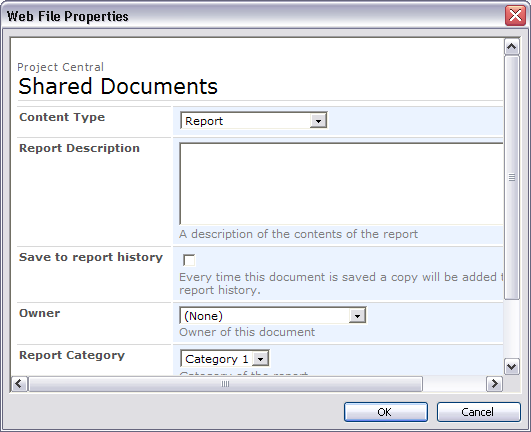
    SharePoint 2007 now supports different "templates" for a document library. These are called "content types". Each content type can have it's own set of meta-data that you can apply to documents.

    So how does this work when you try to save a document from MS Word 2003 up to SharePoint? Quite well actually. When you get to the screen that asks you for your meta-data, you will see a drop down menu of the different content types available in that library.

    As you choose different content types, you will see the set of meta-data fields changing. Here is a screenshot of what it looks like:

    Friday, October 06, 2006

    Fix: Workflow in MOSS 2007 stops working

    Here's one that you might come up against if you are using the Microsoft Office SharePoint Server 2007 Technical Refresh. I was trying to create a new workflow for a document library through the browser. However, when I tried to access the second page in the wizard, I got the following error:

    Critical Error

    There has been a critical error while processing the form.

    Click Start Over to load a new copy of the form. If this error persists, contact the support team for the Web site.

    Click Close to exit this message.

    Details: Too many bytes in what should have been a 7 bit encoded Int32.

    The fix for me was quite straightforward
    1. Run stsadm -o reconvertallformtemplates
    2. Delete your internet explorer browsing history

    Wednesday, October 04, 2006

    MVP for Me!


    What a great start to the week. I've just returned from 8 weeks in Europe to find out that I have been awarded an MVP (Most Valued Professional) in SharePoint by Microsoft. What an honour! Knowing some of the other SharePoint MVPs out there, I am thrilled to be counted in their numbers.

    Yeah, I realize that from your perspective this may not be the most interesting news, but permit me to wallow in the moment, won't you?

    Wallow, wallow, wallow, wallow, wallow, wallow, wallow, wallow, wallow.

    What was I doing in Europe? Well, I went back to Ireland to catch up with the family, then onto Italy for a holiday before dropping into the International Criminal Court in The Hague (Holland - not Belgium) to help them integrate their SharePoint Portal with their Records Management system. What a nice bunch of people, even if you do have to go through barbed wire, electric fences and metal detectors to get to them.

    Friday, September 22, 2006

    Get to know your users

    That clever lad of the Sagi's (disclaimer: I work with him) has made a free web part available on his blog.

    This one helps you encourage users to fill out user profile properties that you have marked a mandatory. Check it out at Sharepoint Tips And Tricks

    Monday, August 14, 2006

    Sydney SharePoint User Group - Tuesday 15 August 2006

    The SharePoint User Group is meeting up again on Tuesday 15 August at Level 14, 24 Campbell Street, Haymarket, Sydney. That's beside Capitol Theatre. This month's topic is all about the Business Data Catalogue in SharePoint 2007. Angus Logan from Microsoft and Sergio Otoya from Winapp will step you through the features.

    All are welcome, just drop an e-mail to SPSUserGroup@uniqueworld.net to let us know if you can make it. More details available at http://sps.uniqueworld.net/sydney

    Wednesday, July 19, 2006

    Microsoft dropping the Office Web Components

    Microsoft are not going to be including the Office Web Components (OWC) in the next release of SharePoint. These are the web parts that allow you to easily display pivot tables, graphs and spreadsheets within SharePoint.

    Why are they doing this? Read all about it on the Excel blog here

    Sunday, June 04, 2006

    Degrees of My Sites

    There are different levels of SharePoint Portal's My Site functionality that you can provide to your end users. Sometimes you may not want your end users to have the full set of features straight away, so it's good to know to what level you can restrict it.

    Here is how I break down the degrees of My Sites:


    1. Public Profile - only provide the public profile page. Users can perform a search to find an individual and view their public profile. Links throughout the portal also allow users to access public profiles. At this level, the end user user does not have a "My Site" link in the top right of their screen, and they don't have the ability to update their profile.

      To enable the public profiles you should schedule the profile import from Active Directory, and ensure your People content source is being indexed regularly.

    2. Basic My Site - at this level, users get the "My Site" link in the top right of their portal pages. The user's My Site will have two sections - public and private. The public section is similar to the public profile page mentioned in the section above, but it will now include an "Edit Profile" option.

      The "Private" section will display information that has been targeted to the user's audiences. This includes the "News for You" and "Links For You" web parts. The user will now also have the ability to subscribe to portal alerts and use the "add to my links" feature. The private section of their My Site will also include web parts to summarize their alerts and "my links".

      The user will still not be able to store any documents on their "My Site".

      To enable this level, you should grant the "User Personal Features" permission to your users.

    3. Full My Site - at this level, the user gets a fully functional My Site. The first time that the user clicks on their "My Site" link, SharePoint will create a personal site with document libraries and lists. The user now has a shared and private document library and can store content within their My Site.

      Note that once the personal site has been created, your SharePoint administrator has no ability to easily modify the web parts and lists on the site. That's why it is a good idea to delay users ability to create them until you have planned them out. Alternatively you can look at a tool called Echo to perform updates to your users personal sites.

      To grant your user the ability to create their site, you should enable the "Create Personal Site" permission to your users.

    It's good to know what your options are with Personal Sites. And it's a good idea to plan in advance how you want to use them. Maybe you want your users to get familiar with other aspects of the portal before they use My Sites. Some companies don't like the idea of users putting personal content onto the portal farm. Either way, you can set up SharePoint accordingly

    Wednesday, May 17, 2006

    Search me

    This is another one of those "lessons I've learnt" posts, that hopefully save someone else the time that I lost. Based on the rules of Karma, eventually I should be able to reclaim my lost time - if not in this life, maybe in the next.

    SharePoint Portal Server has a set of noise word files that it uses to exclude certain terms from it's index. This is to ensure that the indexes don't get cluttered up with terms that no-one searches for like "the", "and", "it".

    Now you can edit these noise word files to either include or exclude words. They are just text files with each noise word on it's own line.

    Imagine my surprise when I edited my noise word files to remove a word ("re"), but my portal search did not return my documents. Here's what I learnt in the process of fixing this problem up:

    1. There are a set of noise word files per portal - not one set for the whole server farm. If you edit the wrong set, it doesn't matter how often you search your portal, you won't get the results you expect.

    2. You need to edit all appropriate noise word files. These are language specific. There are three files that are relevant to english content - noiseeng.txt, noiseenu.txt and noiseneu.txt. Make sure you make the appropriate changes to ALL the files.

    3. If you want to retrieve old content using newly-excluded noise words, reset and rebuild the content indexes. Otherwise SharePoint will only return items added.

    The noise word files are located in a portal-specific sub directory under \Program Files\SharePoint Portal Server\data\applications\ on your SharePoint indexing server. To find out the specific sub directory for your portal, follow these steps:
    1. From the home page of the portal, click Site Settings in the top right corner
    2. Click Configure Search and Indexing
    3. In the Content Indexes section, click on any of the entries
    4. Note the directory path specified in Local Address. Ignore the part after the long code.
    5. Look in the config folder under the folder you identified in the previous step.
    For more information on noise words, see:
    http://support.microsoft.com/default.aspx?scid=kb;en-us;837847#E0ZF0ACAAA

    Tuesday, May 16, 2006

    Web based SharePoint Forms today

    Disclaimer: I work for Unique World, which is the parent company of Unique World Software - the makers of SharePoint Forms and InfoView.

    If you have been involved with InfoPath projects, at some stage you are sure to have wished for a web-based version of the product. Well, that's why our sister-company built InfoView (www.InfoView.net). This is a great tool for quickly converting your InfoPath form to a web based form.

    Well, the crew at Unique World Software are just about to launch a new product built on top of InfoView. This product is called "SharePoint Forms". The nice thing about this product is that you hardly know it's there. Once you have installed it on your SharePoint server, everyone can use your forms libraries - whether they have InfoPath on their desktop or not.

    This is very handy for example when users access your SharePoint site from a VPN. They don't have InfoPath on the desktop, but when they click on the "New Form" button in the forms library, the form is opened up within Internet Explorer. They can fill out their form, and save it back to the forms library, just like they would if they had the InfoPath installed. For those users that have InfoPath, they can continue to work with it.

    If you update your InfoPath form template (XSN), SharePoint Forms will automatically convert it the next time a user wants to open or create a new document. As I said - it just works behind the scene - letting you just get on with filling out your leave request.

    This product has just been launched. For more information, see www.SharePointForms.com

    Sunday, May 14, 2006

    Sydney SharePoint User Group - May 2006

    Just a reminder that the Sydney SharePoint User Group is meeting this Tuesday - May 16th.

    We also have a change of venue this month. Our new location is:

    Level 14
    24 Campbell Street
    Sydney, NSW 2000

    This is near Capitol Theatre, 200 metres from Central Station.

    For more information, visit http://sps.uniqueworld.net/sydney

    Thursday, May 11, 2006

    SPS 2003 and SQL 2005 - backups

    Here's an interesting one. We recently moved our SQL databases for SPS from SQL 200o to a SQL 2005 server. All went well, apart from the SPSBackup.exe scripts. We were getting the following error in the SharePoint logs:

    [Microsoft][ODBC SQL Server Driver][SQL Server]To connect to this server you must use SQL Server Management Studio or SQL Server Management Objects (SMO).


    To solve the problem we uninstalled SQL 2000 client tools from the SPS server and installed the SQL 2005 client tools. That sorted it out for us. The important thing here is that you have to uninstall the SQL 2000 client utilities, otherwise, you'll continue to get the error.

    I guess this also means that if you have a portal farm that is using several SQL databases - for different portals, they should all use the same version of SQL.

    Thursday, April 20, 2006

    Offline SharePoint from Colligo

    One common request with SharePoint is for a user to be able to access information when they are not connected to the network. This is not something that SharePoint really provides out of the box - apart from the ability to publish a read-only version of Contacts and Events lists to Outlook 2003.

    Colligo are about to launch their Contributor product that allows you to take lists and document libraries offline, make changes to them a synchronize back to the server the next time you are connected.

    Not only that, but you can download Colligo Reader for free. As the name suggests, this gives you are a read-only view of your documents and lists. Still very handy.

    Colligo currently does not support threaded discussion, picture libraries, attendees, objectives or survey lists.

    Check them out at http://www.colligo.com/products/sharepoint/index.asp

    Friday, March 24, 2006

    SharePoint accessibility information

    Looking for information on SharePoint accessibility compliance to Section 508 of the Rehabilitation Act? Check out these links:

    http://msdn.microsoft.com/library/default.asp?url=/library/en-us/odc_SP2003_ta/html/Office_SharePointAccessibility.asp

    http://www.microsoft.com/industry/government/section508.mspx

    It's a mixed bag - the document doesn't mention any serious conflicts with the act, but for quite a lot of features, the common answer is - "yes, this can be implemented", which implies doing a lot of site definition modification work.

    Update:
    Here is some details on improvements to accessibility in SharePoint 2007:
    http://blogs.msdn.com/sharepoint/archive/2006/04/24/582506.aspx

    Live Communication Server - I love it!

    We have just implemented our internal Live Communication Server, and it has changed my World. Up to now, most people in the company have been using MSN Messenger, and that has worked well. But LCS just makes the whole thing so much nicer.

    Our company is small enough to have everyone in everyone else's contact list. This is becoming my new phone directory. The user presence information (online, busy, in meeting) details link up to your Outlook calendar, so it's now easier to determine if someone is available.

    I've been using the application sharing feature a lot - even with a colleague that sits opposite me. Maybe we are just lazy, but it's handy to just share Microsoft Word from my desktop and talk him through the document as I scroll through it. The voice chat quality is also great, because it's using our internal network rather than going out to the cloud.

    As for SharePoint - now EVERYONES user presence details appears through-out the web pages. Previously, that only worked if your MSN Messenger e-mail log-in matched your corporate account.

    Tuesday, March 21, 2006

    March Sydney User Group session

    It's that time of month again, where the Sydney User Group get together. This month we have Brett Chase from CommVault talking about data management solutions for SharePoint. Come along if you are in town. Details available at http://sps.uniqueworld.net/sydney.

    Monday, February 20, 2006

    Sydney SPS User Group - Feb 2006

    Don't forget, if you are living in Sydney, come along to the February user group meeting in the city this Tuesday (21 Feb).

    You can find out more details at http://sps.uniqueworld.net/sydney

    Beer and pizza provided.

    Friday, February 17, 2006

    SharePoint Content Databases

    I normally don't spend a lot of time thinking about WSS content databases, but a recent engagement changed all of that.

    The client has a configuration that - while probably not common - is not absolutely crazy either.

    Basically, they have a Virtual Server, and have multiple site collections underneath it, one for each project. To simplify backups, they have decided to have a separate Content Database for each site collection.

    No problem - STSADM includes the CreateSiteInNewDB command. This will add a new content database to our virtual server, and set up our new site collection within it. Done and dusted.

    But then the client peeked inside their WSS configuration database and noticed that some site collections were using the wrong database. So Project D was in Database E, and Project E was in Database F. This is not good, because they use SQL Server for their backup and restores. So when then think they are restoring Project E, they are actually rolling back Project D.

    How did this happen? After some investigation, it turns out that the STSADM Restore command doesn't really care which of the virtual server's content databases it restores to. You can't force it to use a particular database. So although Project D may be in Database D prior to your restore, SharePoint, in it's infinite wisdom may decide to put it into Database E after the restore.

    Microsoft reckon that this is "by design", but it definitely sounds like a flaw in logic to me. We are planning to get around this issue by manipulating the Databases table before and after the restore. Basically we will update the SiteCount values to contain the SiteCountLimit value prior to the restore, and then set them back again afterwards. This should ensure that SharePoint can only use the existing content database for a restore.

    Microsoft announce Office 2007 packages

    Microsoft have just published information to their web site on what applications will be included in each of the Office 2007 bundles. They will now have an Enterprise and Professsional Plus bundle, along with their Professional, Small Business Edition, Standard, Home and Basic.

    http://www.microsoft.com/office/preview/suites.mspx

    They have also released estimated retail prices for each of these editions. While the page lists the server products, no pricing is provided for them. However, it is interesting to note that there isn't a separate SPS + CMS edition. There is a separate server product for online forms - Microsoft Office Forms Server.

    http://www.microsoft.com/office/preview/pricing.mspx

    Interesting stuff

    Thursday, February 09, 2006

    Updates to Microsoft Software Assurance licenses

    Licensing: It's a black art really. If those sisters from Charmed ever came up against an enterprise licensing agreement, I know who my money would be on.

    However, I was reading recently that Microsoft are updating their Software Assurance licensing agreement. A number of changes are coming into affect from March 2006.

    A few things in particular caught my eye. One is the Home Use policy. This allows employees to install copies of MS Office desktop products at home. Imagine - access to the latest and greatest Office 11 and 12 features from your home PC. It will be like Christmas all over again!

    The other interesting amendment is the cold backup licensing. This means that you no longer have to pay for a separate license for a disaster recovery server. The gotcha is that the server must be turned off - i.e. "cold" - until the disaster occurs. You can power it up occasionally to confirm that it is all working, and to perform updates to the environment, but it can't be "warm" - i.e. ready to go in a matter of seconds after the disaster. It also can't be used for load balancing - that would be "hot".

    I believe SQL Server supports the cold backup licensing today without requiring Software Assurance. Here's an extract from the Microsoft SQL licensing FAQ:

    "Failover support, where servers are clustered together and set to pick up processing duties if one computer should fail, is now available in Workgroup, Standard, and Enterprise editions of SQL Server 2005. Under each of these editions, keeping a passive server for failover purposes does not require a license as long as the passive server has the same or fewer processors than the active server (under the per processor scenario)."

    So there you have it - rush out and purchase Software Assurance. As always, consult a trained licensing professional before signing any enterprise agreement. If problems persist, head off to bed and watch Charmed.

    Monday, February 06, 2006

    Some of my favourite date WSS List Formulae

    You know that you can create a calculated column within a list. This is a very useful feature. Here are some formulae that I've used a few times.

    I use these calculated fields for grouping and filtering list items.

    First day of the week for a given date:
    =[Start Date]-WEEKDAY([Start Date])+1

    Last day of the week for a given date:
    =[End Date]+7-WEEKDAY([End Date])

    First day of the month for a given date:
    =DATEVALUE("1/"&MONTH([Start Date])&"/"&YEAR([Start Date]))

    Last day of the month for a given year (does not handle Feb 29). Result is in date format:
    =DATEVALUE
    (CHOOSE(MONTH([End Date]),31,28,31,30,31,30,31,31,30,31,30,31)
    &"/" & MONTH([End Date])&"/"&YEAR([End Date]))


    The name of the month for a given date - numbered for sorting - e.g. 01. January:
    =CHOOSE(MONTH([Date Created]),"01. January", "02. February", "03. March", "04. April", "05. May" , "06. June" , "07. July" , "08. August" , "09. September" , "10. October" , "11. November" , "12. December")

    Monday, January 23, 2006

    Adding an expiry date to a portal listing

    If you create portal listings regularly within your SharePoint portal, you may have noticed that sometimes you see the Start Date and Expiration Date fields, and other times you don't.

    Well, it turns out that SharePoint uses a different template for the Add Listing page depending on whether the area uses the News Area Template or not.

    The good news is that you can change the template used by altering the URL for the Add Listing page. Just append "&Mode=News" to the end of the URL to see the date fields.

    For example, if your "Add Listing" URL looks like this:
    http://Portal/_layouts/1033/spnewlisting.aspx?CatID=3b6a1210-54fb-4ed8-811f-b3d0cd415d2

    Simply change it to this to see the date fields:
    http://Portal/_layouts/1033/spnewlisting.aspx?CatID=3b6a1210-54fb-4ed8-811f-b3d0cd415d2&Mode=New

    Thursday, December 15, 2005

    Problems editing a page in FrontPage

    We have been having a problem at one of our clients. What was going to be an easy update using Frontpage, became a 6 hour banging head against wall, us-against-FrontPage battle.

    The problem:
    Open the WSS site in FrontPage 2003. Open the Default.aspx page.
    Frontpage displays the following error:

    "The server could not complete your request. Contact your Internet service provider or web server administrator to make sure that the server has the frontpage server extensions or sharepoint services installed."
    • We removed FrontPage 2002 Server Extensions from the box
    • We upgraded to WSS SP2
    • We restarted IIS
    • We restarted the server

    Nothing. The following Microsoft KB gave us a hint:
    http://support.microsoft.com/kb/830342/

    There were no custom web parts on our page, so it wasn't too obvious. However, when we looked in the Web Part Page Gallery we found a web part with an error. We dragged it on to the page, then deleted it (thus removing it from the web part page gallery).

    That was it! FrontPage-Nil, Us-One