This is something that I am always trying to figure out. I stumble across a solution and then forget how to do it next time. So here is the link that describes how to set up your VPC so that you can browse to it from the host desktop:
http://blog.devstone.com/aaron/archive/2005/05/03/577.aspx (courtesy of Aaron Zupancic)
Now I know where to find it next time I have to look
Sunday, February 25, 2007
Development Environment for MOSS 2007
I'm interested in working out the best approach for developing on MOSS 2007. My first preference is to have a central MOSS server that is shared by the team and allow developers to debug remotely.
The advantages that I see with this are:
The development environment remains similar to the production environment
Less resources required on each developer's workstation
Better chance of identifying issues with other developer's code early on
Forces you to have good deployment strategies that can be re-used for deploying to test/production/DR environments
The disadvantages are:
Harder to debug - must be done remotely, and from what I hear this is particlarly difficult with workflows
Risk of overwriting other developer's efforts (proper use of a source control product reduces this risk)
May need to co-ordinate debugging/testing with others in the team
For me, the advantages outweigh the disadvantages, but I'm keen to understand other people's experience in this area. Please provide your comments if you have any experience/opinions on this.
The other configurations that I see include:
Installing Visual Studio on the Dev server and allowing developers to remote-desktop on to debug. I dislike this because it means that you have to modify the permissions on the server, it means the Dev and Test environment are significantly different and puts extra load on the dev box. Also only two developers can work on the server at any time (assuming you only have the standard Terminal Service licenses).
Each developer running local Virtual PCs. Because our company mainly does on-site consulting, a lot of our developers have laptops. This makes it more expensive to beef their machines up to a spec that can comforatably run a MOSS 2007 VPC that runs Visual Studio. In fact a few of our laptops cannot have their memory upgraded beyond 1.5 GB. Another hassle here is that each developer is working in isolation. Conflicts between components won't be discovered until a later stage. This risk can be reduced by having strong source control and deployment processes.
I also found this great post from Eli Robilliard on this topic:
http://weblogs.asp.net/erobillard/archive/2007/02/23/build-a-sharepoint-development-machine.aspx
The advantages that I see with this are:
The disadvantages are:
For me, the advantages outweigh the disadvantages, but I'm keen to understand other people's experience in this area. Please provide your comments if you have any experience/opinions on this.
The other configurations that I see include:
I also found this great post from Eli Robilliard on this topic:
http://weblogs.asp.net/erobillard/archive/2007/02/23/build-a-sharepoint-development-machine.aspx

Thursday, February 15, 2007
February SharePoint User Group
For those of you in Sydney, the SharePoint User Group is meeting on Tuesday 20th. This month's presentation will be of particular interest to SharePoint 2007 administrators and developers.
Read more at http://sps.uniqueworld.net/sydney
Read more at http://sps.uniqueworld.net/sydney
Friday, February 02, 2007
Ontolica goes Wild*
Ontolica has announced a free tool for adding wildcard search features to MOSS 2007. Just fill out the form here.
Ontolica will be coming out with more new products this month that extend the MOSS 2007 search features. Here is a look at their roadmap:

Ontolica will be coming out with more new products this month that extend the MOSS 2007 search features. Here is a look at their roadmap:
Monday, January 29, 2007
My new favourite website
I just found out about this website, but I think it's going to become a regular haunt for me. Strangely it has nothing to do with SharePoint:
www.pandora.com
Give them the name of a favourite song or artist and they will create a personalized radio station for you based on that style of music. You can rate each song they give you to help fine-tune the station. And it's all free!
Now that I think about it, it does have something to do with SharePoint. This is very similar to the Knowledge Network component that Microsoft is planning to release later this year.
This wil allow you to track down other people in your organisation that share similar attributes based on your SharePoint profile. It can even look through your e-mails for keywords to suggest to you to add to your profile.
So not only can you find out about new music that you would like, but you can also track down that other person in your organisation that is passionate about Information Architecture for legal firms.
Isn't the internet wonderful?
www.pandora.com
Give them the name of a favourite song or artist and they will create a personalized radio station for you based on that style of music. You can rate each song they give you to help fine-tune the station. And it's all free!
Now that I think about it, it does have something to do with SharePoint. This is very similar to the Knowledge Network component that Microsoft is planning to release later this year.
This wil allow you to track down other people in your organisation that share similar attributes based on your SharePoint profile. It can even look through your e-mails for keywords to suggest to you to add to your profile.
So not only can you find out about new music that you would like, but you can also track down that other person in your organisation that is passionate about Information Architecture for legal firms.
Isn't the internet wonderful?
Wednesday, January 17, 2007
Grouping Documents By More Than Two Levels
We are all very used to organizing our documents by folders. We have been doing it for years in File Explorer. But it does have it's drawbacks. For example you can only organize a set of documents in one way. You might have reports that you file by region. If you wanted to see them by Customer instead, you are stuffed.
Then SharePoint came along and provided meta-data. Now we have the ability to tag our documents with the relevant properties (such as Region and Customer). We can define views based on these properties to see our documents in many different ways. We can even combine folders and meta-data so that users can continue to file documents in folders, while at the same time providing views based on the meta-data.
The "Group By" view option allows you to define a hierarchy for viewing the documents - say by Country and then by Region. But what if you need to go beyond two levels? What if you want to view documents by Country, Region and Store? This article explains how you can achieve this using SharePoint Designer and WSSv3 (most of this is the same in FrontPage 2003 and WSSv2).
I will assume that you already have a document library with the necessary meta-data. To make it more interesting, I'm going to also assume that your documents are stored in a folder structure within the document library.
Launch SharePoint Designer and open your site (File - Open Site...)
Open the default.aspx file in your site. We will place our web part on this page
Select the Data Source Library tab in the right hand task pane
Open the drop down listbox for your Document Library and choose Copy and Modify...

On the Source tab, change the Item and folder scope to RecursiveAll

On the General tab give a meaningful name to this Data Source and click OK

Drag and drop your new data source onto a web part zone. Now click on the > button on the right-hand-side of your new web part. You will see the following menu, select Sort and Group:

Use the Add >> button to specify the fields you want to group your data for. Click on the Show group header checkbox for each of the fields you move across. Click OK once you have finished.
Now from the right-hand-side menu select the Filter option. Specify the filter shown below. This will make sure that folders are not displayed in your web part. Click OK and you are done.


This works if your web part is going to be on the same sub site as the document library. In my next post I'll show you how you can do this with a document library from another site.
Note: I've noticed that once you get to four levels, the web part does not correctly group items. It basically uses the first value it finds to group all items at each of the 4-level-deep branches. If I find a fix to this, I'll let you know.
Monday, January 15, 2007
You've been tagged
Five things you never knew about me
Here are the rules - you get tagged by a colleague/friend/complete stranger, you have to blog five things that people don't know about you and then pick five more people that should do the same.
By my calculations the entire blogosphere should be tagged by February 3rd - I guess it's all part of being Person of the Year.
Ishai Sagi was so kind as to tag me, so here you go:
5. I'm not Canadian. I reckon more people ask me if I am Canadian than any other nationality. I've never even been to Canada (eh?). In fact I'm Irish. I'll admit that my accent isn't a very strong Irish accent. Some people have suggested that the Irish accent has had a strong influence on forming the American accent. Personally I think it's because I watched too much Sesame Street as a kid. So my theory is that people hear me talk and think "hmm, not quite American, he must be one of those Canadians (eh?).
4. I was going to be an RPG programmer for Microsoft. We are not talking about Role Playing Games, this is the Report Program Generator language. I interviewed for a consulting firm doing work at Microsoft in Dublin. Our university was one of the few places that taught RPG and Microsoft were running their manufacturing on an IBM AS/400 at the time (there's one thing you didn't know about Microsoft). In the end, they gave me a job working on VB and SQL projects instead.
3. My first computer was a Sinclair ZX81. I think I was 10 at the time. I remember trying to grasp concepts such as for loops and If/Else statements. I still remember the so-called "touch-sensitive" keys and the fact that you would have to wait about 10 seconds for the screen to refresh every time you pressed a key. After all, it did only have 1 KB of memory.
2. I failed Irish in school. Shameful really. The Irish language is compulsory in school up to your final exams at 18. I was shockingly bad at it. I found it impossible to spell, and the grammar just threw me completely. My poor Irish teacher put in so much effort to helping me, but he got so little out of it. The scary thing is that you need Irish to get into a lot of university courses. Thankfully, the one I wanted didn't require it. I didn't even bother studying the night before my final exam. I worked on my maths study instead (god knows I needed it).
When it came time to do the exam paper, I wrote a letter in English to the examiner, letting him know that he could go off and make himself a nice cup of tea, that I was not going to force my shocking spelling skills on him. When I got my final grades, I wasn't too surprised to discover I failed. My parents weren't that happy and they suggested that I have my paper re-checked. I declined. So now I'm not eligible to apply for any government job in Ireland, which hasn't proved to be a big drawback since I've moved to Sydney.
1. I've had Blues Harmonica lessons - note the distinction between "I've had lessons" and "I can play". I've always been a fan of the Blues, so when I saw some lessons advertised, I signed up with another friend. We gave each other Blues names - he's Magic Eight-Ball Delahunty, I'm Bleeding Gums Wilson. Despite these great names, I have yet to reach a level of proficiency where I'd feel comfortable quitting my day job and make a living busking on the streets.
My turn to tag - not that there are many people left:
- Eddie Geller
- Fernando Felman - blog imminent
- Richard Szalay
- Liam Cleary
- Stephen Cummins
Friday, January 05, 2007
Discovery Wizard for SharePoint
I just found this handy free tool on the Quest website. It will scan your network for servers running SPS, MOSS or WSS (v2 and v3) and display basic information about your servers, site collections and sites.
Discovery Wizard for SharePoint
Discovery Wizard for SharePoint
Thursday, January 04, 2007
Large logs with MOSS
I noticed recently that the log files on my MOSS server were getting very large. These log files are located in C:\Program Files\Common Files\Microsoft Shared\web server extensions\12\LOGS
Each log file was about 500 MB in size, and there were about 20 of them. This was not good. When I looked at the logs I noticed that I was getting a lot of messages for the general category.
So I ran the following command to turn off logging for the general category:
stsadm -o setlogginglevel -category "general" -tracelevel none
Bingo! Log files back to normal size. Some day when I have more time on my hands I'll try to find out what the messages mean.
You can also modify the number of log files MOSS generates from Central Admin:
1. From Central Admin, click Operations Management in the left panel
2. Click Diagnostic Logging
3. Modify the number of trace logs and click OK (I've set my test environment to 5)
Each log file was about 500 MB in size, and there were about 20 of them. This was not good. When I looked at the logs I noticed that I was getting a lot of messages for the general category.
So I ran the following command to turn off logging for the general category:
Bingo! Log files back to normal size. Some day when I have more time on my hands I'll try to find out what the messages mean.
You can also modify the number of log files MOSS generates from Central Admin:
1. From Central Admin, click Operations Management in the left panel
2. Click Diagnostic Logging
3. Modify the number of trace logs and click OK (I've set my test environment to 5)
Thursday, November 16, 2006
WSS Version 3 is Out!
Thanks to Jan Tielens for pointing out to me that WSS version 3 is out the door and a free download from the Microsoft site.
You can also get a trial version of Office Server 2007 - I'm getting light-headed from all this new technology.
This Office Server download includes both the Standard and Enterprise version. Here is the breakdown of functionality as listed on the download site:
Standard edition functionality includes:
* Collaboration
* Enterprise Content Management
* Workflow
* MySites
* Profiles and Personalization
* Enterprise Search
Enterprise edition functionality includes:
* Business Data Catalog
* Excel Services
* Report Center
* Infopath Forms Services
* KPI and Filter Web Parts
You can also get a trial version of Office Server 2007 - I'm getting light-headed from all this new technology.
This Office Server download includes both the Standard and Enterprise version. Here is the breakdown of functionality as listed on the download site:
Standard edition functionality includes:
* Collaboration
* Enterprise Content Management
* Workflow
* MySites
* Profiles and Personalization
* Enterprise Search
Enterprise edition functionality includes:
* Business Data Catalog
* Excel Services
* Report Center
* Infopath Forms Services
* KPI and Filter Web Parts
Wednesday, November 15, 2006
Meet the family
Check out this link for a list of what products are part of the new Microsoft Office suite:
http://office.microsoft.com/en-us/suites/FX101635841033.aspx
I love the fact that there is now a suite called Office Ultimate. It reminds me of washing powder adverts - "now with added stain removers!". I wonder what the marketing team are going to come up with for the next release? Office Infinite?
http://office.microsoft.com/en-us/suites/FX101635841033.aspx
I love the fact that there is now a suite called Office Ultimate. It reminds me of washing powder adverts - "now with added stain removers!". I wonder what the marketing team are going to come up with for the next release? Office Infinite?
Tuesday, November 14, 2006
Central Admin - just another site
I just noticed something - the SharePoint Central Administration site in Office 2007 is just another site collection. This means that you can create lists, subsites and even update the security settings. Heck - you can even modify the web parts on the OOB admin pages! Have a look at the Site Actions menu next time you drop by your Central Administration site.
This is a bit different to version 2 where Central Admin was a very customized site and there wasn't much you could do in the way of modifying it.
But with great power comes great responsibility. Now it means that you are going to have to consider what ways you will customize the Central Administration site for your web farm (of course you could just leave it as it is, but where is the fun in that?)
This is a bit different to version 2 where Central Admin was a very customized site and there wasn't much you could do in the way of modifying it.
But with great power comes great responsibility. Now it means that you are going to have to consider what ways you will customize the Central Administration site for your web farm (of course you could just leave it as it is, but where is the fun in that?)
Friday, November 03, 2006
An early Christmas
According to ITWire SharePoint 2007 is going to be launched on November 30th, along with Vista.
Update: Nov 6, 2006, Microsoft announces that Office 2007 has been released to manufacture (RTM). This is milestone that marks the completion of the development and testing phase. According to their press release it will be available "worldwide" from November 30th.
However, it may be available earlier for companies that have access to the Microsoft software download sites. Certainly the MSDN Subscribers site has an announcement saying that it will be available 7 days from the RTM.
Update: Nov 6, 2006, Microsoft announces that Office 2007 has been released to manufacture (RTM). This is milestone that marks the completion of the development and testing phase. According to their press release it will be available "worldwide" from November 30th.
However, it may be available earlier for companies that have access to the Microsoft software download sites. Certainly the MSDN Subscribers site has an announcement saying that it will be available 7 days from the RTM.
Pricing for SharePoint 2007
I just found this very useful website for working out the cost of Microsoft licenses. The great thing is that it has the SharePoint 2007 prices:
www.microsoft.com/licensing/mpla
After you select your products, you also need to answer some questions about the size of your organisation and the type of licensing you require. Unless you are practiced in the black art of licensing, I'd suggest just accepting the defaults and treating the estimate as a rough guide. Contact your reseller for more accurate numbers.
Here are the figures that I got based on a 1,000 seat corporate deployment with Software Assurance (access to upgrades):
www.microsoft.com/licensing/mpla
After you select your products, you also need to answer some questions about the size of your organisation and the type of licensing you require. Unless you are practiced in the black art of licensing, I'd suggest just accepting the defaults and treating the estimate as a rough guide. Contact your reseller for more accurate numbers.
Here are the figures that I got based on a 1,000 seat corporate deployment with Software Assurance (access to upgrades):
- SharePoint 2007 Server - $11,572
- SharePoint 2007 Server for Internet Access - $107,115 (AUD) - for hosting public websites. This license does not require Client Access Licenses (CALS)
- Standard Client Access License - $243 (AUD)
- Enterprise Client Access License - an additional $195 (AUD) - this provides access to the BDC, Excel Services and InfoPath web forms
Sunday, October 22, 2006
Goodbye useful functionality
I'm in shock. Microsoft have decided to remove one of the most useful features in Excel 12 - the ability to synchronize list data. You can still export data from a WSS list into Excel, and you can still publish information from Excel into SharePoint. But what is missing is the ability to synchronize changes between your Excel list and SharePoint.
Microsoft have decided that this feature should now live in MS Access. The only problem is that organisations rarely deploy Access to all their users, where-as Excel is everywhere.
Excel also provides some really nice features for playing around with your data in an ad-hoc way compared to Access.
Read more about this at Bart Bultinck's blog and at the MSDN Excel blog
Microsoft have decided that this feature should now live in MS Access. The only problem is that organisations rarely deploy Access to all their users, where-as Excel is everywhere.
Excel also provides some really nice features for playing around with your data in an ad-hoc way compared to Access.
Read more about this at Bart Bultinck's blog and at the MSDN Excel blog
Monday, October 16, 2006
Sydney SharePoint User Group for October
As usual, the SharePoint User Group in Sydney will be meeting at Unique
World's offices at Level 14, 24 Campbell Street, Haymarket.
This month Carlos Mora will be demonstrating the new Forms Management
features in SharePoint 2007. All are welcome.
For more information, and to subscribe to e-mail alerts on up-coming
events, visit http://sps.uniqueworld.net/sydney
World's offices at Level 14, 24 Campbell Street, Haymarket.
This month Carlos Mora will be demonstrating the new Forms Management
features in SharePoint 2007. All are welcome.
For more information, and to subscribe to e-mail alerts on up-coming
events, visit http://sps.uniqueworld.net/sydney
SharePoint and Documentum getting chummy
Microsoft and EMC - the makers of Documentum - announced that they will be working to ensure their products compliment each other in the future. Good news if your organisation has both of these technologies.
It also seems that they will be using Vorsite's technology to make this happen.
Here is an extract from the press release:
EMC will bring to market new solutions that seamlessly integrate the EMC Documentum platform with multiple Microsoft solutions and platform technologies including Microsoft Office SharePoint® Server 2007, the 2007 Microsoft Office system, SQL Server™ 2005 and enterprise search solutions. Microsoft provides content management capabilities in SharePoint Server 2007 today. With this new alliance SharePoint users can take advantage of the advanced ECM capabilities of the Documentum platform. Information workers will be able to access the Documentum platform natively from within Microsoft Office SharePoint Server 2007 and the Microsoft Office system, enabling users to leverage the power of the Documentum platform in areas such as advanced records management, business process management, imaging and rich media from their preferred Microsoft applications.
Read more here
And more: a nice article on InfoWorld.com about this
It also seems that they will be using Vorsite's technology to make this happen.
Here is an extract from the press release:
EMC will bring to market new solutions that seamlessly integrate the EMC Documentum platform with multiple Microsoft solutions and platform technologies including Microsoft Office SharePoint® Server 2007, the 2007 Microsoft Office system, SQL Server™ 2005 and enterprise search solutions. Microsoft provides content management capabilities in SharePoint Server 2007 today. With this new alliance SharePoint users can take advantage of the advanced ECM capabilities of the Documentum platform. Information workers will be able to access the Documentum platform natively from within Microsoft Office SharePoint Server 2007 and the Microsoft Office system, enabling users to leverage the power of the Documentum platform in areas such as advanced records management, business process management, imaging and rich media from their preferred Microsoft applications.
Read more here
And more: a nice article on InfoWorld.com about this
Thursday, October 12, 2006
Saving to MOSS using Office 2003
SharePoint 2007 now supports different "templates" for a document library. These are called "content types". Each content type can have it's own set of meta-data that you can apply to documents.
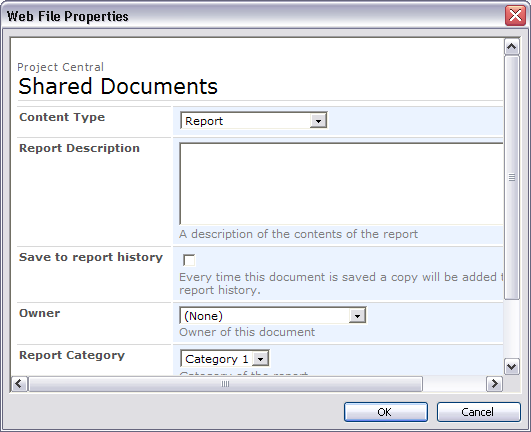
So how does this work when you try to save a document from MS Word 2003 up to SharePoint? Quite well actually. When you get to the screen that asks you for your meta-data, you will see a drop down menu of the different content types available in that library.
As you choose different content types, you will see the set of meta-data fields changing. Here is a screenshot of what it looks like:
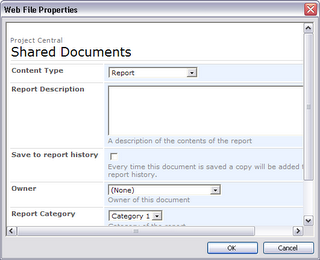
So how does this work when you try to save a document from MS Word 2003 up to SharePoint? Quite well actually. When you get to the screen that asks you for your meta-data, you will see a drop down menu of the different content types available in that library.
As you choose different content types, you will see the set of meta-data fields changing. Here is a screenshot of what it looks like:
Friday, October 06, 2006
Fix: Workflow in MOSS 2007 stops working
Here's one that you might come up against if you are using the Microsoft Office SharePoint Server 2007 Technical Refresh. I was trying to create a new workflow for a document library through the browser. However, when I tried to access the second page in the wizard, I got the following error:
Critical Error
There has been a critical error while processing the form.
Click Start Over to load a new copy of the form. If this error persists, contact the support team for the Web site.
Click Close to exit this message.
Details: Too many bytes in what should have been a 7 bit encoded Int32.
The fix for me was quite straightforward
1. Run stsadm -o reconvertallformtemplates
2. Delete your internet explorer browsing history
Critical Error
There has been a critical error while processing the form.
Click Start Over to load a new copy of the form. If this error persists, contact the support team for the Web site.
Click Close to exit this message.
Details: Too many bytes in what should have been a 7 bit encoded Int32.
The fix for me was quite straightforward
1. Run stsadm -o reconvertallformtemplates
2. Delete your internet explorer browsing history
Wednesday, October 04, 2006
MVP for Me!

What a great start to the week. I've just returned from 8 weeks in Europe to find out that I have been awarded an MVP (Most Valued Professional) in SharePoint by Microsoft. What an honour! Knowing some of the other SharePoint MVPs out there, I am thrilled to be counted in their numbers.
Yeah, I realize that from your perspective this may not be the most interesting news, but permit me to wallow in the moment, won't you?
Wallow, wallow, wallow, wallow, wallow, wallow, wallow, wallow, wallow.
What was I doing in Europe? Well, I went back to Ireland to catch up with the family, then onto Italy for a holiday before dropping into the International Criminal Court in The Hague (Holland - not Belgium) to help them integrate their SharePoint Portal with their Records Management system. What a nice bunch of people, even if you do have to go through barbed wire, electric fences and metal detectors to get to them.
Subscribe to:
Posts (Atom)